
I once fixed a network by turning off auto channel widths on a controller. Every AP was using a mix of widths and it caused a nightmare for clients trying to roam.
Most clients weigh higher data rates in their roaming algorithm. So when they see an AP advertising 160 MHz they think "faster = better" and latch onto it even if it means a worse association at the cell edge. The AP with the wider channel looks more attractive than the one that's actually a better roam candidate.
Setting every 5 GHz channel to 20 MHz and every 6 GHz channel to 40 MHz sorted the whole thing. Clients that could use 6 GHz went there. Everything else stayed on 5 GHz. Double win: the 5 GHz crowd had fewer devices to contend with and the 6 GHz crowd got their own clean spectrum. No hardware swap. No redesign. Just a channel width config change that took 10 minutes.
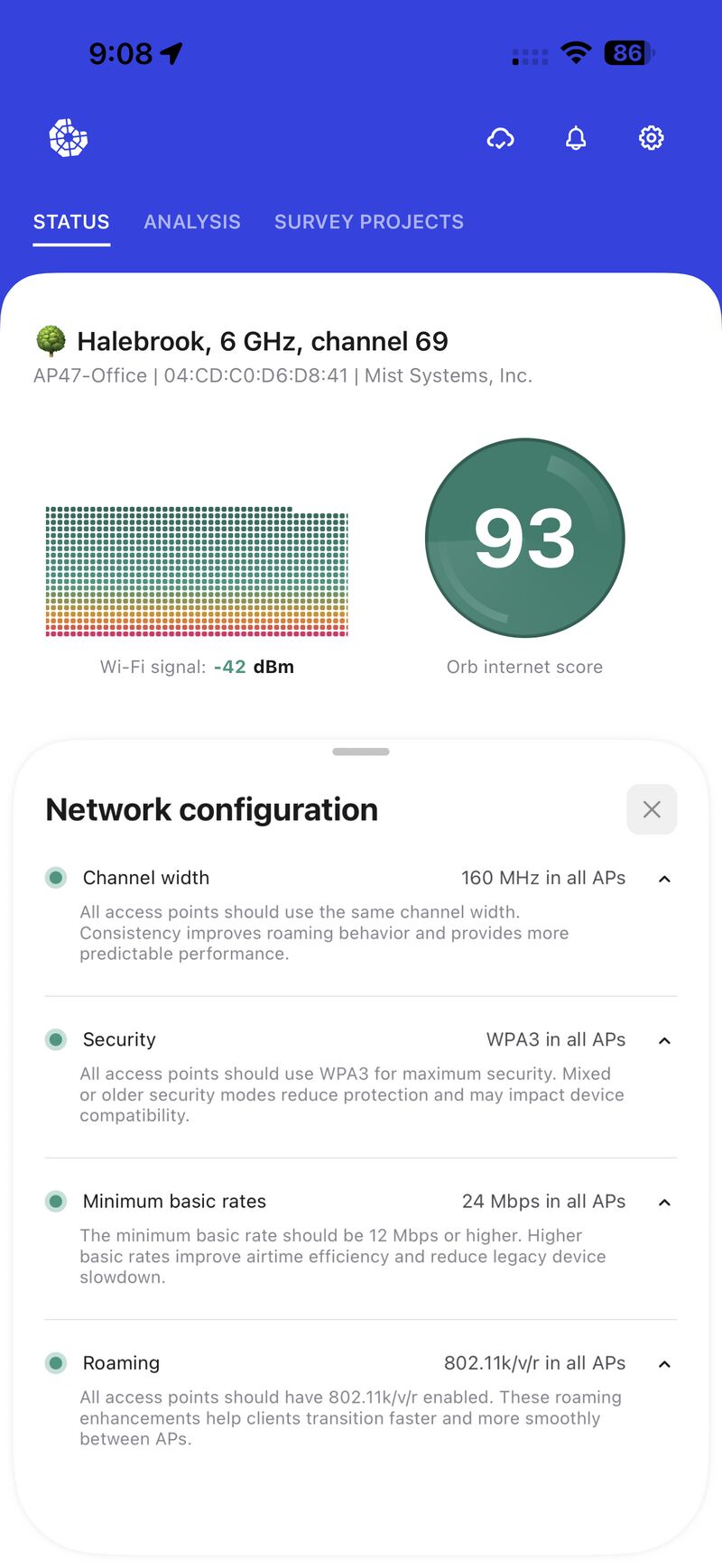
The new status view inside Hamina Onsite flags exactly these kinds of configuration mismatches. Nice and simple.
Ever found a fix that was just turning something off
#network troubleshooting #WiFi roaming fix #channel width settings #network optimization #Hamina Onsite
Most clients weigh higher data rates in their roaming algorithm. So when they see an AP advertising 160 MHz they think "faster = better" and latch onto it even if it means a worse association at the cell edge. The AP with the wider channel looks more attractive than the one that's actually a better roam candidate.
Setting every 5 GHz channel to 20 MHz and every 6 GHz channel to 40 MHz sorted the whole thing. Clients that could use 6 GHz went there. Everything else stayed on 5 GHz. Double win: the 5 GHz crowd had fewer devices to contend with and the 6 GHz crowd got their own clean spectrum. No hardware swap. No redesign. Just a channel width config change that took 10 minutes.
The new status view inside Hamina Onsite flags exactly these kinds of configuration mismatches. Nice and simple.
Ever found a fix that was just turning something off
#network troubleshooting #WiFi roaming fix #channel width settings #network optimization #Hamina Onsite
Shared byJamie Diaz - 4 days ago
Log in to comment
Loading ..
Related Articles

Join Our Exciting LATAM Webinar on Wi-Fi 7 with Gressya Reyes and Diego Huertas

Discover Instant Wi-Fi Insights with Hamina Wireless Onsite App

Integrate Orb SDK with Hamina OnSite for Effortless App Enhancement
Exciting Tech Events in Bangkok: HPE Tech Jam and Hamina Wireless Hands On

Join Dan, Alexis, and Elliot for a Fast and Affordable Wireless Survey Webinar

Master Hamina Onsite Survey Techniques in Just One Day!
28
0/100