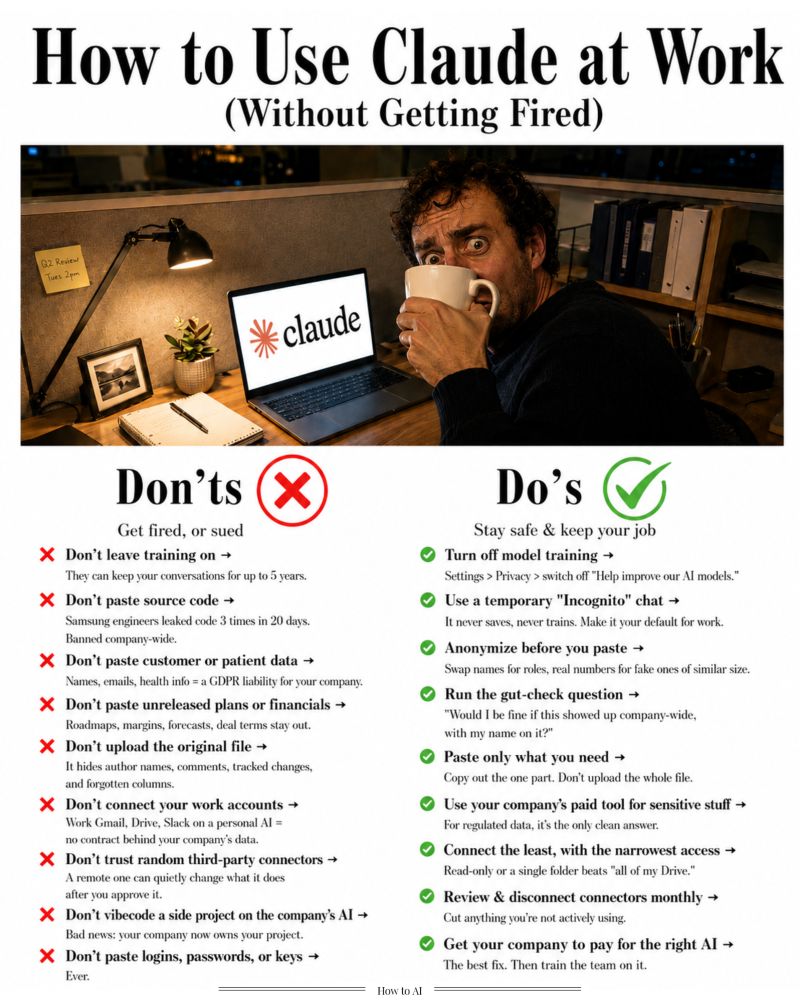

You can get fired for what you paste into Claude.
Here's the Do's & Don'ts that keep you safe at work:
(I am talking about using your personal* Claude at work)
1. You leave model training on by default.
Fix: Claude Settings → Privacy → turn off "Help improve our AI models."
Leave it on & Claude keep your chats up to 5 years.
2. You paste source code to "just check for bugs."
Fix: Don't. Samsung engineers did it 3 times in 20 days and got banned company-wide, with investigations.
3. You paste customer names, emails & numbers.
Fix: That's a GDPR liability for your company. Anonymize first, or use the company's tool.
4. You paste the real names and real numbers.
Fix: Swap names for roles ("the client").
Swap figures for fake ones of similar size.
The shape of the problem is all Claude needs.
5. You upload the original PDF or spreadsheet.
Fix: It carries author names, comments, tracked changes, hidden columns. Copy out the one part you need. Paste only that.
6. You run work tasks in your normal chat.
Fix: Even with training off, normal chats still save to history. Use a temporary "Incognito" chat (top right). Close it, it's gone.
7. You skip the gut-check before pasting.
Fix: Ask "Would I be fine if this showed up company-wide, with my name on it?"
No → anonymize or use the company tool.
8. You think anonymizing makes it 100% safe.
Fix: It drops your risk a lot. Not to zero.
For regulated data (health, legal), the only clean answer is a paid company tool.
9. You paste logins, passwords, access keys.
Fix: Never. Not once.
Read in depth here:
10. You paste unreleased plans and financials.
Fix: Roadmaps, margins, forecasts, deals, anything marked confidential or under NDA - stays out.
11. You connect your work Gmail to your personal AI.
Fix: Never. That pipes your company's entire inbox into a tool with no contract behind it.
12. You connect "all of my Drive" for convenience.
Fix: Connect the least, narrowest access.
Read-only or a single folder.
If you can paste the one thing, skip the connector.
13. You install random third-party connectors.
Fix: Only use the official ones in Claude's directory. A remote connector can quietly change what it does after you approve it.
14. You never review what's connected.
Fix: Once a month, open settings + your Google/Microsoft "third-party access" page.
Cut anything you're not actively using.
15. You vibecode your side quest on company's AI.
Fix: Bad news - your company now owns it.
(Same risk on your personal AI on the work laptop.)
16. You keep fighting for AI budget alone.
The real fix: Get your company to pay for the best AI, and train your team on it. Plain and simple.
That's exactly what I do.
I run a consulting firm in NYC helping enterprises figure out AI (ahem... a lot of Claude).
I take 3 new clients a month with 50-person teams.
If that's you, DM me "AI CONSULTING."
#AIsafety #workAI #dataprotection #AIguidelines #secureAIuse
Here's the Do's & Don'ts that keep you safe at work:
(I am talking about using your personal* Claude at work)
1. You leave model training on by default.
Fix: Claude Settings → Privacy → turn off "Help improve our AI models."
Leave it on & Claude keep your chats up to 5 years.
2. You paste source code to "just check for bugs."
Fix: Don't. Samsung engineers did it 3 times in 20 days and got banned company-wide, with investigations.
3. You paste customer names, emails & numbers.
Fix: That's a GDPR liability for your company. Anonymize first, or use the company's tool.
4. You paste the real names and real numbers.
Fix: Swap names for roles ("the client").
Swap figures for fake ones of similar size.
The shape of the problem is all Claude needs.
5. You upload the original PDF or spreadsheet.
Fix: It carries author names, comments, tracked changes, hidden columns. Copy out the one part you need. Paste only that.
6. You run work tasks in your normal chat.
Fix: Even with training off, normal chats still save to history. Use a temporary "Incognito" chat (top right). Close it, it's gone.
7. You skip the gut-check before pasting.
Fix: Ask "Would I be fine if this showed up company-wide, with my name on it?"
No → anonymize or use the company tool.
8. You think anonymizing makes it 100% safe.
Fix: It drops your risk a lot. Not to zero.
For regulated data (health, legal), the only clean answer is a paid company tool.
9. You paste logins, passwords, access keys.
Fix: Never. Not once.
Read in depth here:
10. You paste unreleased plans and financials.
Fix: Roadmaps, margins, forecasts, deals, anything marked confidential or under NDA - stays out.
11. You connect your work Gmail to your personal AI.
Fix: Never. That pipes your company's entire inbox into a tool with no contract behind it.
12. You connect "all of my Drive" for convenience.
Fix: Connect the least, narrowest access.
Read-only or a single folder.
If you can paste the one thing, skip the connector.
13. You install random third-party connectors.
Fix: Only use the official ones in Claude's directory. A remote connector can quietly change what it does after you approve it.
14. You never review what's connected.
Fix: Once a month, open settings + your Google/Microsoft "third-party access" page.
Cut anything you're not actively using.
15. You vibecode your side quest on company's AI.
Fix: Bad news - your company now owns it.
(Same risk on your personal AI on the work laptop.)
16. You keep fighting for AI budget alone.
The real fix: Get your company to pay for the best AI, and train your team on it. Plain and simple.
That's exactly what I do.
I run a consulting firm in NYC helping enterprises figure out AI (ahem... a lot of Claude).
I take 3 new clients a month with 50-person teams.
If that's you, DM me "AI CONSULTING."
#AIsafety #workAI #dataprotection #AIguidelines #secureAIuse
Shared byDevon Gray - 11 hours ago
Log in to comment
Loading ..
Related Articles

Revolutionize Telecom Engineering: Beyond Single Signal Tracking
Core Network Evolution: From 2G to 5G Explained

Master Skills Effortlessly with Claude: 6 Effective Learning Prompts
Understanding PRB Utilization: Key to Network Health

Demystifying AI: How It Works and Why Understanding It Matters
Understanding 5G NSA vs 5G SA: A Comprehensive Overview
1343
0/100