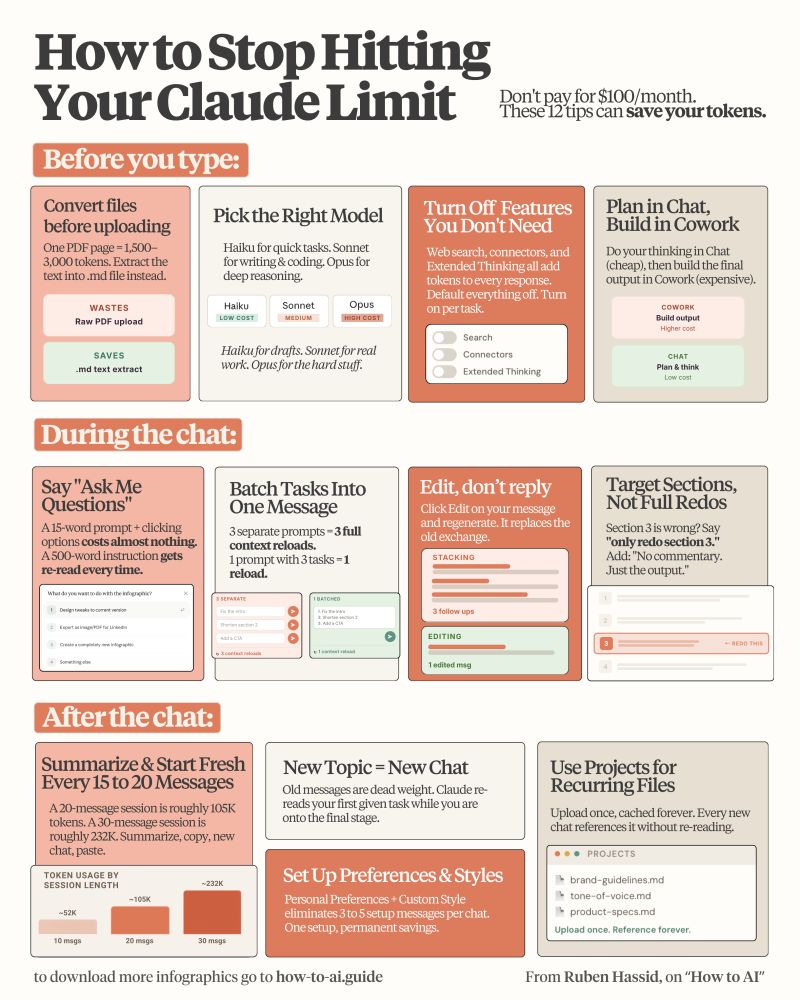

Don't pay $100/month for the Claude Max plan.
These 12 hacks save your tokens (and your wallet):
———————————————————————————
(read all 23 token hacks: https://ruben.substack.com/p/how-to-stop-hitting-claude-usage)
———————————————————————————
1: You upload PDFs raw. One page = 3,000 tokens.
Fix: Paste the text into a Google doc. Download as .md format. Under 200 tokens.
2: You use Opus for a grammar check.
Fix: Haiku for quick tasks. Sonnet for writing & coding. Opus for deep reasoning only.
3: You leave Search & Connectors on by default.
Fix: Default everything off. Turn features on per task, not per account.
4: You build files inside Cowork too early.
Fix: Plan in Chat (cheap). Build the final output in Cowork (expensive).
5: You write 500-word prompts.
Fix: Write 29 words instead: "I want to [task] to [goal]. Ask me questions using AskUserQuestion before you start."
6: You send 3 separate messages for 3 tasks.
Fix: One message, three tasks. "Summarize this, list the points, suggest a headline."
7: You type "No, I meant," stacking on the history.
Fix: Click 'Edit' on your original message. Fix it. Regenerate. History replaced, not stacked.
8: You say "redo the whole thing" to correct part 3.
Fix: "Only redo section 3. Keep everything else. No commentary. Just the output."
9: You never restart. Your chat hits 30 messages.
Fix: Every 15-20 messages → summarize, copy the brief, start a fresh session.
10: You keep 3 topics in 1 chat. It re-reads all of it.
Fix: New topic = new chat. Always. Dead context is dead tokens.
11: You skip Personal Preferences
Fix: Settings → Personal Preferences. Set your tone and style once. It persists forever. Don't waste 3-5 setup messages per chat.
12: You upload the same PDF to 5 different chats.
Fix: Use Projects. Upload once. Every new chat references it without re-burning tokens.
-----
To download all of my Claude infographics:
Step 1. Go to how-to-ai.guide.
Step 2. Subscribe for free. Don't pay anything.
Step 3. Open my welcome email (most skip this).
Step 4. Hit the automatic reply button inside.
Step 5. Download my infographics from my Notion.
Bonus. Enjoy my best copy-paste prompts, too.
#ClaudeMaxSavings #AITokenTips #CostEfficientAI #TokenHacks #AIUsageTips
These 12 hacks save your tokens (and your wallet):
———————————————————————————
(read all 23 token hacks: https://ruben.substack.com/p/how-to-stop-hitting-claude-usage)
———————————————————————————
1: You upload PDFs raw. One page = 3,000 tokens.
Fix: Paste the text into a Google doc. Download as .md format. Under 200 tokens.
2: You use Opus for a grammar check.
Fix: Haiku for quick tasks. Sonnet for writing & coding. Opus for deep reasoning only.
3: You leave Search & Connectors on by default.
Fix: Default everything off. Turn features on per task, not per account.
4: You build files inside Cowork too early.
Fix: Plan in Chat (cheap). Build the final output in Cowork (expensive).
5: You write 500-word prompts.
Fix: Write 29 words instead: "I want to [task] to [goal]. Ask me questions using AskUserQuestion before you start."
6: You send 3 separate messages for 3 tasks.
Fix: One message, three tasks. "Summarize this, list the points, suggest a headline."
7: You type "No, I meant," stacking on the history.
Fix: Click 'Edit' on your original message. Fix it. Regenerate. History replaced, not stacked.
8: You say "redo the whole thing" to correct part 3.
Fix: "Only redo section 3. Keep everything else. No commentary. Just the output."
9: You never restart. Your chat hits 30 messages.
Fix: Every 15-20 messages → summarize, copy the brief, start a fresh session.
10: You keep 3 topics in 1 chat. It re-reads all of it.
Fix: New topic = new chat. Always. Dead context is dead tokens.
11: You skip Personal Preferences
Fix: Settings → Personal Preferences. Set your tone and style once. It persists forever. Don't waste 3-5 setup messages per chat.
12: You upload the same PDF to 5 different chats.
Fix: Use Projects. Upload once. Every new chat references it without re-burning tokens.
-----
To download all of my Claude infographics:
Step 1. Go to how-to-ai.guide.
Step 2. Subscribe for free. Don't pay anything.
Step 3. Open my welcome email (most skip this).
Step 4. Hit the automatic reply button inside.
Step 5. Download my infographics from my Notion.
Bonus. Enjoy my best copy-paste prompts, too.
#ClaudeMaxSavings #AITokenTips #CostEfficientAI #TokenHacks #AIUsageTips
Shared byDakota Bose - 20 days ago
Log in to comment
Loading ..
Related Articles
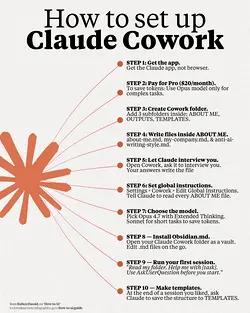
Maximize Your Cowork Setup with These Easy Steps
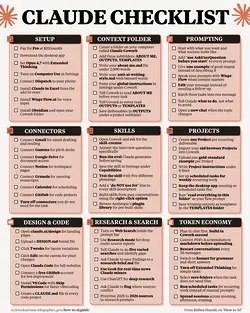
Ultimate 1-Page Checklist to Master Your Use of Claude AI
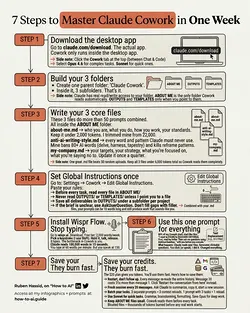
Quick Setup Guide for Claude Cowork: Organize and Optimize in Minutes

Beyond the LLM: The 7 Steps to Build a Reliable AI Agent
Top AI Tool Stack of 2026: Must-Haves for Assistants, Developers, and More
Mastering AI Efficiency: The Top 1%'s Secret 8-File Setup
2086
0/100